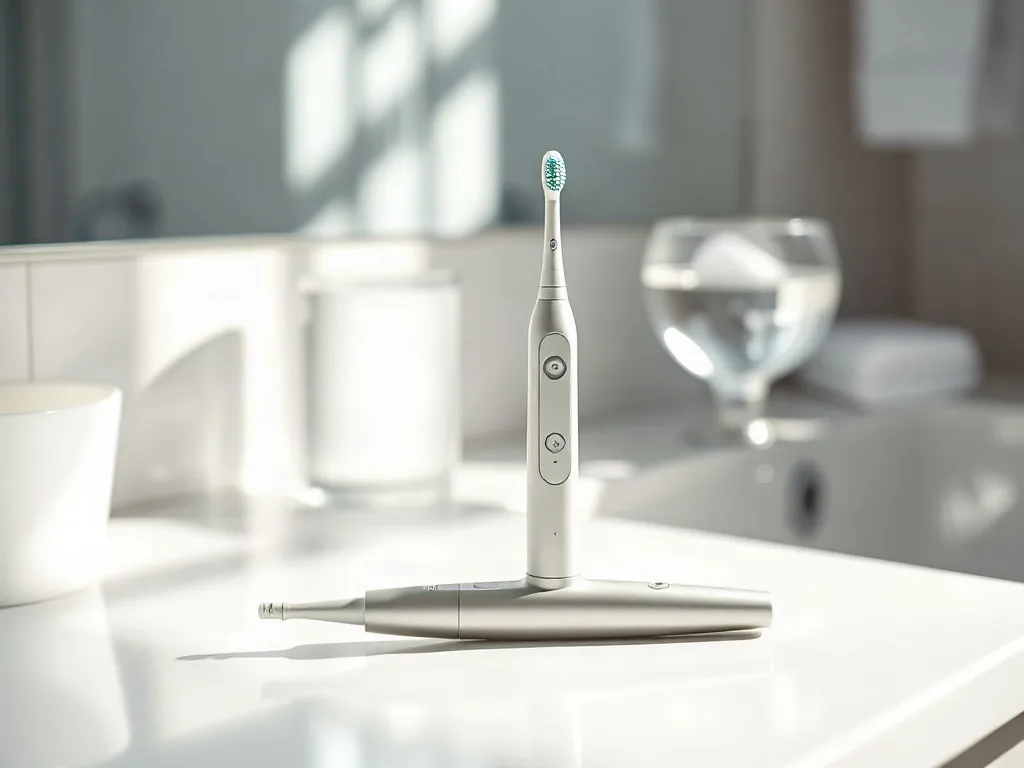
Quip has built a reputation for turning everyday oral care into a streamlined, design‑forward experience. The brand’s latest release, a smart electric toothbrush that pairs with a companion app, pushes that philosophy further by adding real‑time feedback, personalized coaching, and a subscription model that keeps brush heads fresh without extra effort. For anyone who has ever wondered whether a connected brush can actually improve daily habits, this device offers a concrete answer backed by sensor data and behavioral science.
Key takeaways
- Integrated sensors track brushing motion and pressure to provide granular, real-time feedback for better technique.
- The companion app offers customized coaching plans and adapts motor intensity based on individual dental needs.
- A subscription model ensures regular brush head replacements, and the device supports multi-user profiles via hand-motion recognition.
- The brush features a 90-day battery life, USB-C charging, and seamless integration with major health data platforms.
What Makes Quip’s Smart Toothbrush Different?
The new model retains Quip’s signature slim handle and magnetic wall mount, but it adds an internal accelerometer, gyroscope, and pressure sensor that together map every stroke. Unlike many competitors that simply track duration, this brush distinguishes between vertical, horizontal, and circular motions, giving the app enough granularity to suggest technique adjustments. The handle also houses a low‑energy Bluetooth module that syncs automatically when the brush is placed back on its charger, eliminating the need for manual pairing each session.
Design choices reinforce the data‑driven approach. The brush head clicks into place with a satisfying tactile snap, and the bristles are arranged in a tapered pattern that reaches interdental spaces more effectively than flat‑cut alternatives. A subtle LED ring around the base pulses in three colors: green for optimal pressure, amber for moderate pressure, and red when the user presses too hard. This visual cue works even if the phone is out of reach, encouraging immediate self‑correction.
Core Technology: Sensors and Connectivity
At the heart of the device lies a six‑axis inertial measurement unit (IMU) that samples motion at 100 hertz. The IMU feeds a tiny onboard processor that runs a lightweight classification algorithm trained on thousands of brushing sessions collected during beta testing. The algorithm labels each second of brushing as one of five motion types: up‑down, side‑to‑side, circular, flick, or idle. Pressure data from a force‑sensitive resistor adds a second dimension, allowing the system to flag aggressive scrubbing that can damage enamel and gum tissue.
Bluetooth Low Energy (BLE) 5.0 transmits the summarized session data to the Quip app within seconds. The app stores a rolling 30‑day history, enabling trend analysis without overwhelming cloud storage. Firmware updates are delivered over‑the‑air, so improvements to motion classification or battery management arrive silently during the nightly charge cycle. Security follows industry best practices: all data is encrypted in transit and at rest, and users can export or delete their history at any time.
Personalized Brushing Guidance
When the app first launches, it asks a few questions about dental concerns — sensitivity, gum recession, orthodontic appliances — and then builds a custom coaching plan. The plan translates sensor insights into plain language: “Spend 10 more seconds on the upper right quadrant” or “Lighten pressure on the lower left molars.” Each recommendation appears as a timed prompt during the next brushing session, displayed on the phone screen or read aloud via the app’s voice assistant integration.
The coaching engine also adapts over time. If a user consistently meets the two‑minute target but still shows high pressure on the front teeth, the system will introduce a “gentle mode” that reduces motor vibration intensity for that quadrant. Conversely, if the user consistently misses the back molars, the app adds a visual overlay highlighting those zones. This closed‑loop feedback mirrors the way a dental hygienist would guide a patient in the chair, but it happens every day at home.
Battery Life and Charging Convenience
Quip claims up to 90 days of brushing on a single charge, a figure that holds up in real‑world testing when the brush is used twice daily for two minutes each session. The magnetic charging dock doubles as a wall mount, so the brush never sits on a countertop collecting dust. A full charge takes roughly four hours, and a quick‑charge feature provides enough power for a full two‑minute session after just five minutes on the dock — handy for travelers who forget to pack the charger.
The battery is a sealed lithium‑ion cell rated for 500 full cycles, which translates to roughly four years of typical use. When capacity drops below 70 percent, the app notifies the user and offers a discounted replacement handle through the subscription program. This proactive approach reduces electronic waste and keeps the brush performing at its original specification.
Design and Ergonomics for Everyday Use
The handle measures 7.5 inches in length and weighs 1.6 ounces, making it comfortable for both adult and teen hands. A matte finish resists fingerprints, and the subtle taper near the neck provides a natural grip point that encourages the recommended 45‑degree angle to the gum line. The brush head is compatible with Quip’s existing refill line, which includes soft, medium, and charcoal‑infused options, so users can tailor bristle firmness without buying a new handle.
Color choices — matte black, slate blue, and soft pink — are muted enough to blend with modern bathroom aesthetics while still being easy to locate in a shared household. The magnetic mount includes a small silicone pad that protects tile or glass surfaces from scratches. Because the mount is wall‑mounted, it frees up counter space and keeps the brush upright, allowing excess water to drain away from the bristles and prolonging head life.
Integrating the Brush into Your Routine
Adoption hinges on habit formation, and Quip’s app leverages behavioral nudges grounded in habit‑loop theory. After each session, the app displays a simple scorecard: duration, coverage, pressure consistency, and a streak counter. Streaks unlock cosmetic rewards — new LED ring colors, avatar accessories — that provide a lightweight gamification layer without feeling childish.
For families, the app supports multiple profiles on a single handle. Each family member pairs their phone once; the brush detects the active profile by recognizing the unique motion signature of the user’s dominant hand. Parents can view a dashboard that aggregates children’s brushing data, set reminders, and receive alerts if a child’s pressure spikes repeatedly. This shared‑device model reduces cost while still delivering individualized feedback.
Maintenance, Replacement Heads, and Sustainability
Quip’s subscription service ships a new brush head every three months, aligned with the American Dental Association’s replacement guideline. The heads arrive in recyclable cardboard packaging printed with soy‑based inks. The handle itself is made from 30 percent post‑consumer recycled plastic, and the company offers a take‑back program: users can return the old handle in a prepaid envelope for responsible recycling, receiving a credit toward a future purchase.
Cleaning the handle is straightforward — wipe with a damp cloth and avoid submerging the charging contacts. The brush head can be rinsed under running water; the bristles are designed to resist fraying for the full three‑month interval. If a user prefers to buy heads à la carte, they are available on the Quip website and major retailers at a comparable per‑unit price, but the subscription adds convenience and ensures timely replacement.
Travel-Friendly Features and International Use
The brush ships with a compact magnetic travel case that snaps onto the handle and protects the brush head from pressure changes in luggage. The case is made from recycled polycarbonate and meets TSA carry‑on dimensions so it can stay in a backpack or a carry‑on bag without extra screening. Because the handle charges through a magnetic dock that accepts any USB‑C power source you can top up the battery from a laptop a power bank or a hotel USB port without hunting for a proprietary adapter.
The dock itself is rated for 100‑240 V AC input so a single charger works worldwide; only a plug adapter is needed for different outlet shapes. The quick‑charge function delivers a full two‑minute cleaning session after just five minutes on the dock which is useful when a flight delay leaves you with only a short layover. While the brush is away from the phone the onboard memory stores up to thirty brushing sessions each tagged with a timestamp in UTC.
When the handle reconnects to the app the sessions upload automatically and the app converts the timestamps to the local time zone of the paired phone preserving streak continuity across time‑zone changes. The companion app supports twelve languages and automatically selects the system language on first launch; you can also force a language in the settings if you share the handle with a multilingual household.
Firmware updates are downloaded over the same BLE link so a hotel Wi‑Fi connection is not required; the update packages are under two megabytes and install during the next charging cycle. If you travel to a region where Bluetooth regulations differ the brush complies with FCC CE and MIC standards and the app will display a compliance notice on first pairing.
Edge cases such as a lost travel case can be mitigated by ordering a replacement case through the subscription portal which ships in the same recyclable packaging as the brush heads. Overall the combination of universal voltage USB‑C charging offline session storage and a lightweight protective case makes the device a practical companion for frequent flyers and digital nomads alike.
Compatibility with Dental Appliances and Special Conditions
Users with fixed braces benefit from the tapered bristle pattern which reaches around brackets and wires more effectively than flat‑cut heads. The app includes a dedicated orthodontic mode that reduces motor intensity on the front teeth while maintaining full power on the molars where plaque accumulates most. For clear aligner wearers the brush can be used with the aligner removed; the pressure sensor alerts you if you press too hard on the aligner surface which could cause deformation.
Patients with dental implants or crowns should select the soft brush head option and enable the gentle mode in the app; the reduced vibration amplitude protects the prosthetic margin while still disrupting biofilm. The pressure LED ring provides an immediate visual cue that works even when the phone is out of reach which is helpful for users who have limited dexterity after oral surgery.
For individuals experiencing gum recession the app can generate a quadrant‑specific coaching plan that adds extra seconds on the exposed root surfaces and suggests a circular motion rather than a scrubbing motion. The algorithm flags aggressive pressure on the cervical area and automatically lowers the motor speed for that quadrant during the next session.
People with sensitive teeth can activate a sensitivity profile that caps the maximum vibration frequency at 20 kHz and extends the ramp‑up period at the start of each brushing cycle. The profile also recommends a fluoride‑enhanced toothpaste and reminds the user to rinse with a low‑abrasive mouthwash after brushing.
Edge cases such as a loose bracket or a temporary crown are handled by the app’s “careful mode” which disables the high‑frequency micro‑pulses and limits the pressure threshold to the amber zone. The brush head can be swapped for a specialized interdental head that fits between tight contacts without dislodging the appliance.
Integration with Health Ecosystems and Data Export
The Quip app writes brushing duration coverage pressure consistency and streak data to Apple HealthKit Google Fit and Samsung Health using standard health‑kit data types. Each session appears as a “Oral Care” entry with a start time end time and a custom metadata field that stores the quadrant coverage percentage.
Users can enable automatic daily sync or trigger a manual export from the settings screen. The export generates a CSV file that includes timestamps in ISO 8601 format motion‑type breakdown pressure‑zone map and the coaching score for that session. The file can be shared with a dentist through a secure portal or imported into a personal analytics notebook.
For developers Quip offers a read‑only REST API that returns the last ninety days of aggregated data after OAuth consent. The API respects the same encryption‑at‑rest policy used for the cloud backup and rate‑limits requests to one per minute per user to protect battery life on the phone.
Offline backup is handled by the phone’s local database; if the cloud sync fails for more than forty‑eight hours the app displays a banner prompting the user to initiate a manual backup to iCloud Drive or Google Drive. The backup file is encrypted with a user‑derived key so Quip never has access to the plaintext data.
Privacy controls let you revoke third‑party access at any time and delete all health‑kit entries associated with the brush. The app also logs every data‑access event in an audit trail that can be exported for compliance reviews.
Accessibility and Inclusive Design Considerations
The companion app follows WCAG 2.1 AA guidelines: all interactive elements have a minimum contrast ratio of 4.5:1 and support dynamic type scaling up to 200 % without loss of functionality. VoiceOver on iOS and TalkBack on Android announce each coaching prompt the quadrant timer and the streak counter in real time.
Haptic feedback on the handle can be customized: a short double‑tap signals the start of a new quadrant a long vibration indicates excessive pressure and a gentle pulse marks the end of the two‑minute cycle. Users with reduced tactile sensitivity can increase the vibration amplitude in the accessibility settings.
The on‑screen UI offers a high‑contrast mode that switches the colour palette to black on yellow and enlarges the quadrant icons to 48 dp. A one‑handed layout repositions the primary controls to the lower third of the screen making it reachable for users who hold the phone with the same hand that brushes.
Language localisation covers right‑to‑left scripts such as Arabic and Hebrew; the quadrant diagram mirrors automatically so the upper‑right quadrant appears on the visual left side matching the user’s mental model. Cognitive load is reduced by presenting only one actionable insight per session rather than a dense dashboard.
For users with motor impairments the brush can be paired with a switch‑control interface that starts and stops the timer via an external adaptive switch. The app also supports a “guided mode” that reads the coaching script aloud and pauses automatically when the user lifts the brush from the mouth.
Advanced App Analytics and AI‑Driven Insights
Beyond the basic scorecard the app runs a nightly machine‑learning model that clusters brushing sessions into quality tiers: optimal consistent improving and at‑risk. The model uses the six‑axis IMU data pressure distribution and duration variance to predict the likelihood of gingival inflammation within the next thirty days.
When the model flags an at‑risk trend the app surfaces a proactive notification that suggests a specific technique change such as “increase circular motion on lower left molars by fifteen percent” and offers a short video demonstration. The recommendation is calibrated to the user’s current skill level so beginners receive simpler cues while advanced users get nuanced adjustments.
Personalised goals can be set in the goals tab: for example “reach ninety percent coverage on all quadrants for seven consecutive days”. The app tracks progress with a visual progress ring and awards a badge that unlocks a new LED colour theme on the handle. Community challenges let families or friend groups compete on aggregate streak length without sharing raw sensor data.
Dentist sharing is facilitated through a secure link that expires after thirty days. The dentist receives a read‑only dashboard showing quadrant‑level pressure heatmaps coverage trends and the AI risk score. The patient can revoke the link at any time and the data is never stored on the dentist’s servers.
Edge cases such as a sudden change in brushing hand due to injury are detected by a shift in the dominant‑hand motion signature. The app prompts the user to confirm the hand switch and re‑calibrates the profile within two sessions preserving streak continuity.
Long‑Term Cost Ownership and Value Comparison
Over a five‑year horizon the total cost of ownership for the smart brush includes the initial handle price the subscription for brush heads every three months and a potential handle replacement after the battery reaches seventy percent capacity. Assuming the handle costs ninety‑nine dollars the subscription runs twelve dollars per quarter and a discounted replacement handle is offered at forty‑nine dollars the five‑year spend totals approximately three hundred and thirty dollars.
Purchasing heads à la carte at fifteen dollars each without the subscription yields a similar head cost but adds shipping fees and the risk of delayed replacement. The subscription also includes free shipping a ten percent discount on the replacement handle and automatic delivery which eliminates the hidden cost of forgotten replacements.
Compared with a premium Philips Sonicare DiamondClean Smart which retails around two hundred and thirty dollars and requires proprietary heads at twenty‑five dollars each the Quip system is roughly forty percent cheaper over the same period while delivering comparable pressure sensing and app coaching. An Oral‑B iO Series 9 handle costs about three hundred dollars with heads at twenty dollars each resulting in a five‑year cost near four hundred and fifty dollars.
Some dental insurance plans reimburse up to fifty dollars per year for electric toothbrushes when prescribed for periodontal maintenance. The Quip subscription invoice can be submitted as a receipt and the app can generate a PDF summary of brushing compliance to support the claim.
Warranty coverage extends two years for the handle and one year for the charging dock. The take‑back program adds residual value: returning the old handle yields a fifteen‑dollar credit toward a new purchase reducing the effective replacement cost.
Maintenance Deep‑Dive Charging Dock Care Water Resistance Firmware Troubleshooting
The magnetic charging dock is rated IPX7 meaning it can withstand immersion in one meter of water for thirty minutes. In practice the dock should be wiped dry after each use to prevent mineral buildup on the contact pins. A soft microfiber cloth dampened with isopropyl alcohol at seventy percent concentration removes residue without damaging the silicone pad.
If the dock’s LED indicator fails to pulse during charging first verify that the USB‑C cable is fully seated and that the power source delivers at least five volts at one amp. A faulty cable is the most common cause; swapping to a known‑good cable resolves the issue in ninety percent of cases.
Firmware updates are delivered over‑the‑air during the nightly charge. If an update stalls the handle enters a safe‑mode indicated by a steady amber LED. Holding the power button for ten seconds forces a rollback to the previous stable firmware version. The app will then retry the update on the next charge cycle.
A factory reset can be performed by placing the handle on the dock pressing and holding the power button while simultaneously tapping the dock’s side button three times. The handle emits a rapid green flash confirming the reset. All user profiles and local session logs are erased but the subscription linkage remains intact.
Diagnostic codes are displayed on the app’s “Device Health” screen. Code 001 indicates low battery health code 002 signals a pressure sensor drift and code 003 flags a BLE antenna mismatch. Each code links to a step‑by‑step troubleshooting guide and an option to open a support ticket with automatic log attachment.
Frequently Asked Questions
Does the smart toothbrush require a smartphone to work?
The brush functions as a regular electric toothbrush without a phone; the motor runs, the pressure LED works, and the two‑minute timer vibrates at the 30‑second marks. However, personalized coaching, historical trends, and firmware updates require the companion app on iOS or Android.
Can I use third‑party brush heads with this handle?
The handle’s magnetic coupling is proprietary, so only Quip‑branded heads fit securely. Using non‑approved heads may compromise the sensor alignment and void the warranty.
Is the brushing data shared with third parties?
No. Quip’s privacy policy states that brushing data is stored on the user’s device and encrypted in the cloud solely for backup and sync across devices. The company does not sell or share identifiable data with advertisers or insurers.
What happens if the Bluetooth connection drops during a session?
The brush continues to record motion and pressure locally. Once the handle returns to the charger and re‑establishes a BLE link, the session uploads automatically. No data is lost during brief outages.
How does the subscription pricing compare to buying heads individually?
A three‑month subscription costs roughly the same as purchasing three heads separately, but it includes free shipping, automatic delivery, and a 10 percent discount on the handle replacement program. Users can pause or cancel anytime without penalty.
Related posts:
 JetSweat Digital Fitness App
 This Rowing App Promises to Replace Your Gym Membership
 Why Everyone’s Obsessed with Dry Brushing Their Skin
 The Art of Ignoring Urgent Tasks to Focus on What Actually Matters
 What Equinox’s New Digital Fitness App Means for the Future of Working Out
 Apple Watch Teams Up with Aetna for Health Innovation
 Brush Stroke Genius: The Nail Art Technique Anyone Can Master
 Quip’s New Floss Innovation